Thank you for visiting! If you liked the site, please add a bookmark, else add a critical comment! Would you like to visit Greece? Traditional Greek flag This real estate site is only available in Greek! The holy mountain

Friday, 29 December 2023

Windows 10 nightmare: Stucked in preparing the notorious automatic repair screen


Dear HP & windows 10 user community, I hope this might help you bypass the vicious circle of windows 10 or even 11, never ending preparing automatic repair process.

My current laptop model is HP Pavilion Power - 15-cb007nv, which I used to teach & present IT lessons. One cannot image how much time I have spent in setting up the development environments, servers, database, middle ware and so on...  It seems a thermal sensor malfunctions only when I attempt to start windows 10. Oddly within the BIOS & UEFI, all tests for system, sole components and storage have been so far successful. The only finding was a 12% wear damage of the toshiba boot m2 drive. Could that be so crucial?

I have cleaned & switched the positions of the fans, in an attempt to trick the sensors. Directly after  the UEFI test the system has started windows successfully, only once. Since then it stalls, while booting or attempting to reset windows and finally shuts down.  A black background screen informs of a previous thermal shutdown, and that from now on operation ought to be normal!

I have already contacted a local greek HP partner, but they got 20 € only to tell me that there are no spare parts available, after a week. (Irreparable because of a broken right hinge, but the lid still closes ).A daylight robbery! What is worse, I cannot find any hints about the position of the sensors in any hp document. As always missing info is always what I find in technical documentation...

 Thinking of a format and  a fresh install of OS, perhaps Linux, would it bypass or solve the issue? Not a clue...Unfortunately starting from a usb stick to reinstall using the windows media creation utility, simply does not work... It is a pity having paid for a windows OS, but not being able to actually use it, and spending huge amounts of time and effort to make it work, or not?

A possible way out?

Starting up with a open suse tumbleweed os usb stick allowed me to setup and test the laptop, unlike the windows startup stick.

settings

Up until now all works perfectly, including the now clean fans, except missing drivers, ie for the nvidia graphics geforce gtx 1050 card, and who knows what is next... Sadly the bios warning about an older overheating problem is still there, decelerating the  startup time!

All in all, linux might be primitive, complex, or whatever negative  adjective you name it, but for me it simply works! It is a shame that Plaisio computers in Athens, Greece, did not take any time to actually test the laptop operation, in an attempt to urge me buy a new one. In addition, it is strange that HP does not provide  all spare parts & drivers, support for such alternative OS like linux, which can extend the lifetime of the hardware. My old 2009 pavilion still works (upgraded to win10), because the quality of the old hardware was optimal then, allowing a regular cleaning. The present covers & cases of the newer hp laptop, which has not been cheap at all (bought in late October 2018 at a price of 1000 euros) now are made of plastic of lowest quality. The original screws do not fit in properly, any more!

I have heard so often that the EU law ought to enforce genuine  and fair technology competition, saving  the resources of the planet, money and the environment,the consumers' right to repair even any electrical appliance, isn't that true?


Monday, 1 November 2021

Netbeans 12 internal PHP server misbehaving?

This new post will offer some solutions for users testing their simple, non database driven, PHP web application on the standalone internal PHP server of Netbeans IDE 12. If one does not want to start the Apache server within xampp, ampp,lamp or whatever distribution one likes, the PHP internal web server option during the project creation screens of Netbeans will do the job.


The new php project dialog
However, the page might not display at all, and the reason can be found in the private folder of the netbeans project directory nbproject. There are usually two text files created, containing project deployment related info. The private.properties for a working app should look like that:
copy.src.files=false
copy.src.on.open=false
copy.src.target=YOUR_DRIVE_CHARACTER:\\xampp\\htdocs\\YOUR_PROJECT_NAME
index.file=index.php
run.as=INTERNAL
url=http://localhost:8000/
hostname=localhost
port=8000

Usually the IDE generates mistypes to the contents of the second paragraph, containing the instructions to run on the internal PHP web server. For example: run.as=LOCAL would make your project not to run on the internal server.


Tuesday, 15 September 2020

Ελληνική Βιοτεχνική Εταιρία - Διπλάρειος Σχολή: Πρόσκληση εκδήλωσης ενδιαφέροντος για φοίτηση

This new post concerns only greek speaking people, willing to study IT in Athens, at the vocational school of the hellenic handycrafts society. Therefore the invitation text will be only in Greek!


Η Ε.Β.Ε.- Διπλάρειος Σχολή, ιδρυθείσα το 1892 με έδρα το κέντρο των Αθηνών, πλησίον της πλατείας Ομονοίας κα της Βαρβακείου αγοράς, προσφέρει μέσω του I.I.E.K. της, προγράμματα σπουδών και κατάρτισης σε αποφοίτους ελληνόφωνου λυκείου (ή ισότιμης σχολής), 100% δωρεάν, στα εξής γνωστικά αντικείμενα:

  1. Στέλεχος Διοίκησης και Οικονομίας στον Τομέα του Τουρισμού
  2. Τεχνολογίες επικοινωνίας και πληροφοριών στην ταξιδιωτική βιομηχανία
  3. Τεχνικός Εφαρμογών Πληροφορικής (Πολυμέσα/Web designer-Developer/ Video games)

Τέλος το Κε.Δι.Βι.Μ.2 της Διπλαρείου σχολής, προσφέρει τα εξής προγράμματα:

  1. Επεξεργασία επιφανειών ξύλου με ξυλόφυλλα (Μαρκετερί)
  2. Σχεδιαστικές Εφαρμογές για Κουζίνες, Ντουλάπες, Γραφεία και Πρακτική Εφαρμογή.

Οι εγγραφές γίνονται εντός του Σεπτεμβρίου και τα μαθήματα αρχίζουν εντός του Οκτωβρίου.

Επικοινωνία για περαιτέρω πληροφορίες: Πλατεία Θεάτρου 3, 10552, Αθήνα, 210-3240130, iiek@diplareios.edu.gr, www.diplareios.edu.gr

Saturday, 10 August 2019

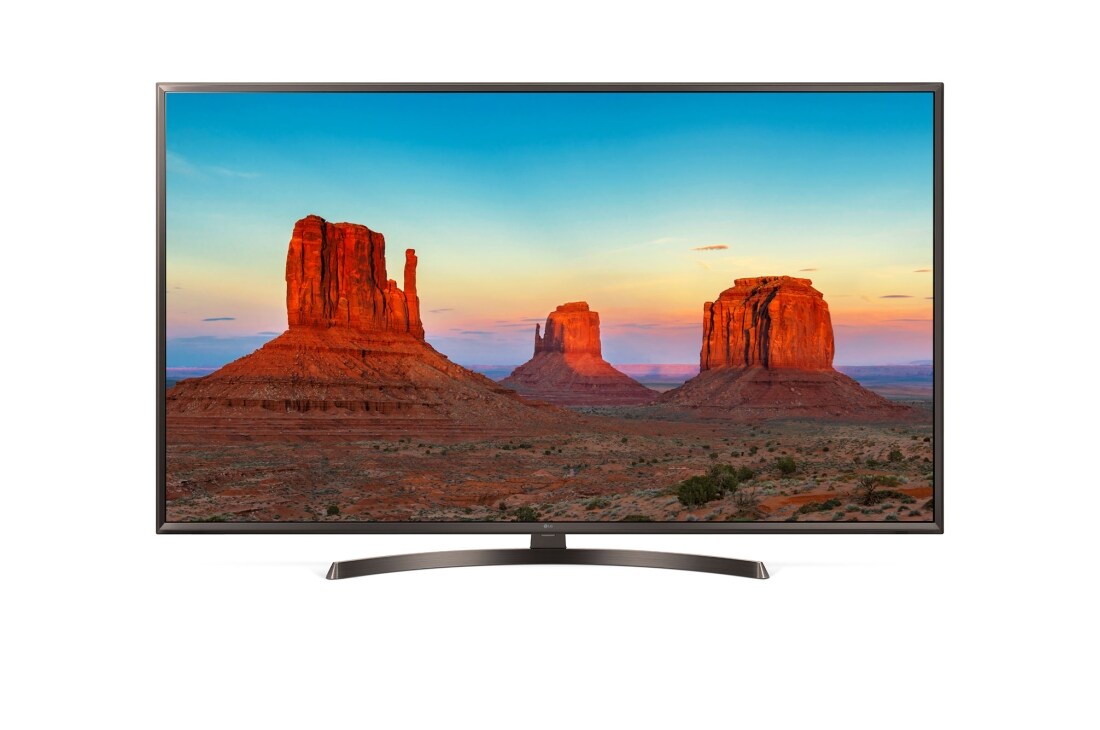
A not so technical review of LG 43UK6400PLF UHD smart TV series

Did you notice the strange circular arc stand?
This new post describes my experiences regarding the use of the 43 inch  LG 43UK6400PLF Ultra High Definition 4k, following the review path of the 32LF650V smart tv. More or less the contents of the other post concerning the LG 32 LB650 still apply, but there are some more or less stale news as well.
On the bright side, the PMI refresh rate as reported by the manufacturer, see here more analytical specs, has been increased to 1600 Hz, offering a clearer high definition view than the predecessor. Especially during ultra high definition satellite reception, which is presently the sole way for  free 4k content.  Bluetooth support, HDR, IPS Miracast, Intelligent Voice Recognition, only for selected tongues, are also  welcome additions or maybe not... One needs to pay special attention to what one says nowadays,  is it not true? The initial assembly is also simplified and that might explain once more the brevity of the printed owner's manual. By the way, the manual authors have again spent almost two pages describing the functions of the optional magic remote, which is to be purchased separately for around 50€. Although Adobe flash player is still missing, one could experiment starting up some third party  software, such as the nova player, and attempt to update it. Hopefully the built in primitive internet browser will be able to play online streaming content full screen, as provided by internet broadcasting services such as asestv.com. Sadly  I see a trend of promoting streaming only via paid services and subscription apps asking online for credit cards numbers, such as netflix etc. That could keep someone shivering and trembling. Regular manual updating of the WebOS is namely necessary for safety and security reasons,  please bear in mind that auto updating does not always work, especially when the tv ip address assignment is dynamic!
On the dark side, the cumbersome menu structure, the still archaic browser,  the tv operation via the even smaller remote control, remain as good, or bad, as before. A convenient and cheaper alternative to buying the magic remote, is connecting a wheel mouse to the usb port of the tv or using the LG provided smart phone app. Beware whatever you type thus, circulates around the internet, so that advertisers can identify your interests or needs! Sadly connecting a microsoft natural keyboard for entering text, did not work again. Moreover, some people as always claimed that the strange plastic stands are of moderate to low quality and that the tv does not allow to switch off entirely.  However, one can still disable the standby led light by changing the settings in order to save energy. Another regular complaint is the so often "Out of memory error", appearing while browsing the internet. Hopefully the updates will solve that problem too.
All in all, the setup is fast, but the software quality of the open source based WebOS  remains disputable, I 'd rather have another OS, or at least a modern browser installed instead. For a price of less than 400€ it seems to be worth the money only for people having access to a satellite dish. Watching online streaming is still troublesome, since the broadband lines are still too slow, unreliable, depending on the time of the day and the weather.

Friday, 4 May 2018

Comments on Cloud Native Java: Designing Resilient Systems with Spring Boot, Spring Cloud, and Cloud Foundry

As the title says the authors emphasizes on proprietary open source technologies based on Spring Boot and Java 1.8. The  huge text assumes an advanced reader who  not only has solid experience in several Cloud computing  vendors, namely Amazon web services,   but also in Spring, REST web services, integration and design architecture. This is clearly not a book for introductory level java programmers wishing to learn Spring or Java, although there is a guide about setting up the relevant IDE and so on. I quote the contents of the text at a glance:
  • The Basics: learn the motivations behind cloud native thinking; configure and test a Spring Boot application; and move your legacy application to the cloud
  • Web Services: build HTTP and RESTful services with Spring; route requests in your distributed system; and build edge services closer to the data
  • Data Integration: manage your data with Spring Data, and integrate distributed services with Spring’s support for event-driven, messaging-centric architectures
  • Production: make your system observable; use service brokers to connect stateful services; and understand the big ideas behind continuous delivery
On the bright side, the code snippets presented in the text are coloured, making it easier to grasp it gist, and pleasant to the eye. Although the authors favour the open source movement, there is plenty of criticism i.e. on microservices architecture drawbacks, mainly due to overuse or misuse.
On the dark side there is a long list of errata on the publishers site, which at the time of reading the book was still unconfirmed.
All in all the book offers an enormous amount of useful information, but in my opinion still lacks of some more official after sales support by the authors.

Friday, 26 January 2018

Comments on Beginning serverless computing, by M.Stiegler, APress

On the bright side the book is well organized, written in American English and presents a neat introduction to the three most popular cloud providers Amazon Web Services, Azure and Google Cloud. Although Heroku is not presented, but only mentioned once,  neither IBM nor Oracle cloud is even mentioned at all, as if they did not exist... Rainy days for both Oracle cloud and IBM? I only hope that the experts of Sun  can develop a solution which is capable of weather (or even  climate) modification of  the cloud business landscape, or  better cloudscape. After all their motto has always been "the network is the computer", or not?
 Coming back to the book, the language used to create the sample apps is exclusively Typescript, a stricter version of JavaScript, Visual studio code is the IDE used, along with Kudu, Node, the Serverless Framework for deployment, Mongo DB as NoSQL Database, Postman for testing and GitHub for versioning among others. Prior knowledge of all Rest & Json technologies is assumed, since there is almost no introduction to any, but short descriptions.
On the dark side, the use cases of the applications presented are so simple, that the code of the book is scarcely reusable. The code is at the moment oddly not available online on the publisher's site, but on Github.
All in all, the author develops a hotel room service order app in each cloud provider, comparing the different terminologies, data stores and costs, warning about possible traps, which might strip your bank account some hefty amounts of money. By the way always keep in mind that opening a personal, not a company, account for learning cloud development sometimes requires giving access to your personal banking  details such as your debit  or credit card number. At the last chapter an agnostic method of development  is  presented.  The text addresses several issues, such as vendor lock in, but the security issues i.e. of guarding online database data is in my opinion not addressed widely enough.

Monday, 29 May 2017

Netbeans 8: Setting up the current java development kit

This new post addresses another repetitive task which draws the attention of a Java developer, as the time goes by and newer versions of the jdk become available for the public. That is updating the Netbeans IDE with the most current version by editing the file:

 "C:\PathtoProgramFiles\NetBeans 8.1\etc\netbeans.conf"

Although the IDE is smart enough to locate an existing jdk, every time it starts, it stalls and shows this message.


A sample netbeans.conf file follows below  for  your reference.

# Default locations of userdir and cachedir:
# (http://wiki.netbeans.org/FaqWhatIsUserdir)
#
# On Windows ${DEFAULT_USERDIR_ROOT} will be replaced by the launcher
# with "<AppData>\NetBeans" where <AppData> is user's
# value of "AppData" key in Windows Registry under
# "HKCU\Software\Microsoft\Windows\CurrentVersion\Explorer\Shell Folders"
# and ${DEFAULT_CACHEDIR_ROOT} will be replaced by the launcher
# with "<Local AppData>\NetBeans\Cache" where <Local AppData> is user's
# value of "Local AppData" key in Windows Registry under
# "HKCU\Software\Microsoft\Windows\CurrentVersion\Explorer\Shell Folders"
#
# On Mac ${DEFAULT_USERDIR_ROOT} will be replaced by the launcher
# with "~/Library/Application Support/NetBeans" and
# ${DEFAULT_CACHEDIR_ROOT} with "~/Library/Caches/NetBeans"
#
# On other systems ${DEFAULT_USERDIR_ROOT} will be replaced by the launcher
# with "~/.netbeans" and ${DEFAULT_CACHEDIR_ROOT} with "~/.cache/netbeans"
#
# You can also use ${HOME} variable which will be replaced with
# user.home JVM system property value. This variable is valid only in
# netbeans_default_userdir and netbeans_default_cachedir properties.
#
# NOTE: If you specify a non-default userdir path on command line
# (--userdir option) and don't specify a cachedir path (--cachedir option),
# cachedir will be in "<userdir>/var/cache".
#
# Cachedir must be different from userdir. The same cachedir and userdir
# would cause problems.
#
netbeans_default_userdir="${DEFAULT_USERDIR_ROOT}/8.1"
netbeans_default_cachedir="${DEFAULT_CACHEDIR_ROOT}/8.1"

# Options used by NetBeans launcher by default:
# (can be overridden by explicit command line switches)
#
# Note that default -Xmx is selected for you automatically.
# You can find these values in var/log/messages.log file in your userdir.
# The automatically selected value can be overridden by specifying -J-Xmx
# here or on the command line.
#
# If you specify the heap size explicitly, you may also want to enable
# Concurrent Mark & Sweep garbage collector.
# (see http://wiki.netbeans.org/FaqGCPauses)
#
netbeans_default_options="-J-client -J-Xss2m -J-Xms32m
 -J-Dapple.laf.useScreenMenuBar=true -J-Dapple.awt.graphics.UseQuartz=true
 -J-Dsun.java2d.noddraw=true -J-Dsun.java2d.dpiaware=true 
-J-Dsun.zip.disableMemoryMapping=true"

# Default location of JDK:
# (set by installer or commented out if launcher should decide)
#
# It can be overridden on command line by using --jdkhome <dir>
# Be careful when changing jdkhome.
# There are two NetBeans launchers for Windows (32-bit and 64-bit) and
# installer points to one of those in the NetBeans application shortcut
# based on the Java version selected at installation time.
#
netbeans_jdkhome="C:\PathToJava\jdk1.8.0_131"

# Additional module clusters:
# using ${path.separator} (';' on Windows or ':' on Unix):
#
#netbeans_extraclusters="/absolute/path/to/cluster1:/absolute/path/to/cluster2"

Wednesday, 17 August 2016

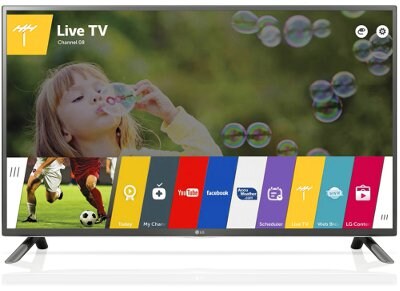
A technical review of LG 32LF650V smart tv 3d series

This new post describes my experiences regarding the use of the 32 inch  LG 32LF650V smart tv. More or less the contents of the other post concerning the LG 32 LB 650 still apply, but there are some news as well.
On the bright side, the refresh rate has been increased to 900 Hz offering a clearer high definition view then the predecessor, especially during satellite reception.  The initial assembly is also simplified and that might explain the brevity of the printed owner's manual. By the way, the manual authors have spent almost two pages describing the functions of the magic remote which is to be purchased separately for around 50€. Although Adobe flash player is still missing, one could experiment starting up some third party  software, such as the nova player, and attempt to update it. Hopefully the built in internet browser will be able to play online streaming content full screen, as provided by internet broadcasting services such as filmon.    Regular manual updating of the WebOS might also help, please bear in mind that auto updating does not always work!
On the dark side, the menu structure, browser,  the tv operation via the remote control remain as good, or bad, as before. A convenient and cheaper alternative to buying the magic remote, is connecting a wheel mouse to the usb port of the tv. Sadly connecting a microsoft natural keyboard for entering text, did not work for me! Moreover, some people claimed that the plastic stands are of moderate to low quality and that the tv does not allow to switch off entirely.  However, one can disable the standby led light by changing the settings in order to save energy. Another regular complaint is the so often "Out of memory error" appearing while browsing the internet. Hopefully the updates will solve that problem too. After several updates the situation worsened: some streaming providers such as dw.com, which functioned well, just ceased to work!
All in all, the software quality of the linux open source based WebOS remains disputable, I 'd rather have android installed instead. For a price of 369€ it seems to be worth the money, only for people having access to a satellite dish. Watching online streaming is still troublesome, since the broadband lines are still too slow and unreliable.The smart tv browser is so bad, that streaming is almost out of question, some web sites can not display correctly either. What is worse is the memory errors thrown often when a web page is big. Allowing to install another open source browser such as Tor, firefox or opera might help. Only the standard tv functions well, but if one has paid a high price for a smart tv, not only a plain one, that is purely a waste of money!

Thursday, 14 July 2016

A technical review of Android development using Android Studio 2.1.2

Photo from the Keramikos ancient cemetery, Athens, Greece
This new post describes my findings while developing a small android 
sightseeing application of about 4 MB in size, targeting English 
speaking tourists already visiting, or planning to travel to Athens,
 Attica, Greece using android version 4.3 devices, or newer.

 
On the dark side the development environment is so rapidly changing, 
that after less than six months, half the code of the book I was reading
 was already deprecated!
Moreover one has to daily download hundreds of MB, to update,
 which can be sometimes distracting. The IDE is also too CPU demanding 
 and memory hungry, 8 GB or even more are recommended, when simulators are needed.
Editing the gradle settings for the specific project might save you from overheating
your CPU.  Please read your console output and edit accordingly, here is only an instance: 
 
# Project-wide Gradle settings.
# IDE (e.g. Android Studio) users
:# Gradle settings configured through the IDE *will override* 
# any settings specified in this file.
# For more details on how to configure your build environment visit 
# http://www.gradle.org/docs/current/userguide/build_environment.html
# Specifies the JVM arguments used for the daemon process.
 # The setting is particularly useful for tweaking memory settings. 
# Default value: -Xmx10248m -XX:MaxPermSize=256m 
org.gradle.jvmargs=-Xmx2048m -XX:MaxPermSize=512m
 -XX:+HeapDumpOnOutOfMemoryError -Dfile.encoding=UTF-8
# When configured, Gradle will run in incubating parallel mode.
 # This option should only be used with decoupled projects. More details, visit
 # http://www.gradle.org/docs/current/userguide/multi_project_builds.html
#sec:decoupled_projects 
# org.gradle.parallel=true 
 
Furthermore, one has to test each device screen size and android version separately at a time, 
having all handheld devices  available  is rather impossible, which may make development 
cumbersome and expensive. For one cannot upgrade the mobile or tablet OS to a newer version,
 unless one pays the higher (almost double) price of a Nexus device! 
 
On the bright side, the libraries and online services provided are extensive
 and effectively help the programmer to integrate mapping and calculating the distance, 
or route between two places. The documentation offers a basic skeleton of code samples
 to build upon, and naturally one has to search how to fit all pieces of the puzzle together.
 
All in all, the initial target of java seems not to be met, the doctrine write once run 
everywhere, is now not valid, since as far as I know, one cannot run the app on a traditional
 linux java virtual machine, such as Web OS of a  LG smart tv, 
 which I find rather disturbing.
 Such proprietary solutions are successful and bring up to now certainly big corporate 
profits, but I wonder whether and for how much longer in the future will the consumers
 and international organizations tolerate it.

Saturday, 4 April 2015

A technical review of LG LB650 smart tv series

The  smart TV menu

This article mentions some technical characteristics and personal experiences of setting up and  using  the LG 3D smart tv series for a limited time. The specific model at hand is 32LB650, which comes with WebOS and also provides a satellite receiver.
On the bright side,  the tv offers trouble free ways of wireless and ethernet connection,USB and HDMI sockets, comes with 2 pairs of 3D glasses, which I have not been able to test, hence 3D content is still rather scarce to find in a reasonable price. The 500Hz refresh rate is good for watching sports, but when the background has stripes of different colours the picture quality deteriorates. The ecological function is wonderful, as the tv LEDs dim automatically while the daylight decreases.
On the dark side, the assembling   and installation procedure is rather poorly described in the manual. Furthermore, the remote control is practically suited only for traditional, non smart tv operation. One has either to buy a magic remote for 50 € by LG, or setup an application for the mobile called LG TV plus almost for  free. This offers a touch pad similar to laptop users, full access to the WebOS menu applications and normal functions of the regular tv use, such as switching off or lowering the volume. However, the application sends all user commands  via the internet and maybe the LG servers, to the tv, meaning that perhaps all user input is captured and analyzed for statistical, business,  or any other reasons. Therefore, an internet connection is required, no Bluetooth option as far as I can tell. On the other hand, Samsung offers an additional remote for smart tv operation at no extra cost.  What is worse is the primitive  web browser, which does not allow neither any downloads, nor acrobat plugin installation. Thus, playing the vast majority of videos or watching live stream tv channels on line is often impossible. Only newest HTML 5 pages are compatible. Having contacted the LG support for offering a solution did not brought back any reply or hint. Moreover, the browser throws often out of memory errors and the bookmarks cannot be organized in folders. I guess that internally a java virtual machine is running, or maybe not?
All in all, the menu and regular or satellite tv operation works well, the sound is crystal clear, but the WebOS seems in my personal opinion, not suitable for smart tv operation, Finally, the browser leaves a great deal  of bug fixes and improvements to be expected in future releases.

Saturday, 1 February 2014

JDeveloper 12c to 11g backwards migration

In case you could not wait to migrate your last project to the currently newer version of JDeveloper 12c, you might have been disappointed with several recurring  errors, or an entire EJB 3 application not running at all.
Familiar or not?


In this new post a solution for returning to the older version will be presented, for those who receive an error message that the workspace cannot open any more with JDeveloper 11g . The exact phrasing is: " Unable to load application file. Workspace already migrated to newer version (12.1.2.0.0)".

Migration can still be undone!

One needs to edit the .jws workspace with an editor, first commenting out the lines mentioning the 12.1.2.0.0 version like this:

<?xml version = '1.0' encoding = 'UTF-8'?>
<jws:workspace xmlns:jws="http://xmlns.oracle.com/ide/project">
   <hash n="adrs-workspace-properties">
      <value n="adrs-instance-binding" v="DefaultServer"/>
      <value n="deploy-timeout" v="0"/>
      <value n="runtime-application-name" v="ejb3inaction"/>
   </hash>
   <hash n="adrs-workspace-weblogic-properties">
      <value n="hot-class-reload" v="ide-default"/>
   </hash>
   <value n="application-package-prefix" v="actionbazaar"/>
   <url n="application-source-directory" path="src/"/>
   <value n="appTemplateId" v="#genericApplicationTemplate"/>
   <hash n="appWebServicePolicy">
      <value n="location"/>
      <value n="LOCATION_TYPE" v="policy.config.PolicyOptions.LocationType.FILE_STORE"/>
      <value n="SERVER_LOCATION" v="IntegratedWebLogicServer"/>
   </hash>
   <hash n="component-versions">
      <value n="oracle.adf.share.dt.migration.jps.JaznCredStoreMigratorHelper" v="11.1.1.1.0"/>
      <!--value n="oracle.adf.share.dt.migration.wsm.PolicyAttachmentMigratorHelper" v="12.1.2.0.0"/-->
<value n="oracle.adf.share.dt.migration.wsm.PolicyAttachmentMigratorHelper" v="11.1.2.0.0"/>     
<value n="oracle.adfdt.controller.adfc.source.migration.SavePointDataSourceForWLSMigrator" v="11.1.1.1.0"/>
      <value n="oracle.adfdtinternal.model.ide.security.extension.AdfSecurityMigrator" v="11.1.1.1.0.13"/>
      <value n="oracle.adfdtinternal.model.ide.security.wizard.AdfSecurityMigrator" v="11.1.1.1.0.13"/>
      <value n="oracle.ide.model.Project" v="11.1.1.1.0;11.1.2.0.0"/>
<!--value n="oracle.ide.model.Project" v="11.1.1.1.0;11.1.2.0.0;12.1.2.0.0"/-->     
<value n="oracle.jbo.dt.jdevx.deployment.JbdProjectMigrator" v="11.1.2.0.0"/>
      <value n="oracle.jdevimpl.appresources.ApplicationSrcDirMigrator" v="11.1.2.0.0"/>
      <value n="oracle.jdevimpl.deploy.ear.OarMigratorHelper" v="11.1.1.1.0"/>
      <value n="oracle.jdevimpl.deploy.mar.MarMigratorHelper" v="11.1.1.1.0"/>
      <value n="oracle.jdevimpl.deploy.migrators.JeeDeploymentMigrator" v="11.1.2.0.0"/>
      <value n="oracle.jdevimpl.xml.oc4j.ds.DataSourcesMigratorHelper" v="10.1.3.5.0"/>
      <value n="oracle.jdevimpl.xml.oc4j.jps.JpsConfigMigratorHelper" v="11.1.1.1.0.1"/>
      <value n="oracle.jdevimpl.xml.wl.WeblogicMigratorHelper" v="11.1.1.1.0"/>
      <value n="oracle.mds.internal.dt.deploy.base.MarMigratorHelper" v="11.1.1.1.0"/>
      <value n="oracle.mds.internal.dt.ide.migrator.MDSConfigMigratorHelper" v="11.1.1.0.5313"/>
   </hash>
   <list n="contentSets">
      <string v="oracle.mds.internal.dt.ide.appresources.MDSAppResourceCSProvider/MDSAppContentSet"/>
      <string v="oracle.jdeveloper.model.PathsConfiguration/ADFContentSet"/>
      <string v="oracle.jdeveloper.model.PathsConfiguration/ApplicationSrcContentSet"/>
      <string v="oracle.jdeveloper.model.PathsConfiguration/ApplicationLevelMavenPOMContentSet"/>
      <string v="oracle.jdeveloper.model.PathsConfiguration/ApplicationBuildToolContentSet"/>
      <string v="oracle.jdeveloper.model.PathsConfiguration/ResourceBundlesContentSet"/>
   </list>
   <list n="listOfChildren">
      <hash><url n="URL" path="Model/Model.jpr"/></hash>
      <hash><url n="URL" path="UserInterface/UserInterface.jpr"/></hash>
   </list>
   <hash n="oracle.jdeveloper.deploy.dt.DeploymentProfiles">
      <hash n="profileDefinitions">
         <hash n="ejb3inActionV2">
            <hash n="archiveOptions">
               <value n="compressed" v="true"/>
               <value n="hasManifest" v="true"/>
            </hash>
            <value n="defaultConnection" v="standalone"/>
            <hash n="dependencies">
               <list n="dependencyList">
                  <hash>
                     <value n="adapterClass" v="oracle.jdevimpl.deploy.common.ArchiveProfileDependable"/>
                     <url n="ownerURL" path="Model/Model.jpr"/>
                     <value n="pathInEar" v=""/>
                     <value n="profileName" v="ejb3inactionModel"/>
                  </hash>
                  <hash>
                     <value n="adapterClass" v="oracle.jdevimpl.deploy.common.ArchiveProfileDependable"/>
                     <url n="ownerURL" path="UserInterface/UserInterface.jpr"/>
                     <value n="pathInEar" v=""/>
                     <value n="profileName" v="ejb3inActionV2"/>
                  </hash>
               </list>
            </hash>
            <url n="earURL" path="deploy/ejb3inActionV2.ear"/>
            <value n="enterpriseAppName" v="ejb3inActionV2"/>
            <hash n="fileGroups">
               <list n="groups">
                  <hash>
                     <list n="contributors">
                        <hash>
                           <value n="type" v="9"/>
                        </hash>
                     </list>
                     <value n="displayName" v="Application Descriptors"/>
                     <hash n="filters">
                        <list n="rules">
                           <hash>
                              <value n="pattern" v="**"/>
                              <value n="type" v="0"/>
                           </hash>
                        </list>
                     </hash>
                     <value n="internalName" v="ear-metainf"/>
                     <value n="type" v="1"/>
                  </hash>
                  <hash>
                     <value n="displayName" v="Application Libraries"/>
                     <hash n="filters">
                        <list n="rules">
                           <hash>
                              <value n="pattern" v="xml.jar"/>
                              <value n="type" v="1"/>
                           </hash>
                           <hash>
                              <value n="pattern" v="xmlparserv2.jar"/>
                              <value n="type" v="1"/>
                           </hash>
                           <hash>
                              <value n="pattern" v="adf-controller-rt-common.jar"/>
                              <value n="type" v="1"/>
                           </hash>
                           <hash>
                              <value n="pattern" v="adf-controller-api.jar"/>
                              <value n="type" v="1"/>
                           </hash>
                           <hash>
                              <value n="pattern" v="adf-controller.jar"/>
                              <value n="type" v="1"/>
                           </hash>
                           <hash>
                              <value n="pattern" v="**"/>
                           </hash>
                        </list>
                     </hash>
                     <value n="internalName" v="libraries"/>
                     <list n="selectedLibraries"/>
                     <value n="targetWithinJar" v="lib"/>
                     <value n="type" v="3"/>
                  </hash>
               </list>
            </hash>
            <hash n="libraryDependencies">
               <list n="unselectedLibraries"/>
            </hash>
            <value n="profileClass" v="oracle.jdeveloper.deploy.ear.EarProfile"/>
            <value n="profileName" v="ejb3inActionV2"/>
         </hash>
      </hash>
      <list n="profileList">
         <string v="ejb3inActionV2"/>
      </list>
   </hash>
   <hash n="oracle.jdeveloper.deploy.SecurityDeploymentSettings">
      <value n="Security-Deployment-Migrate-Users-And-Groups-Key" v="true"/>
      <value n="Security-Deployment-Overwrite-Application-Policies-Key" v="true"/>
      <value n="Security-Deployment-Overwrite-Credentials-Key" v="true"/>
   </hash>
   <hash n="oracle.jdeveloper.model.PathsConfiguration">
      <hash n="ApplicationSrcContentSet">
         <list n="pattern-filters">
            <string v="+**"/>
         </list>
         <list n="url-path">
            <url path="src/"/>
         </list>
      </hash>
   </hash>
   <hash n="oracle.mds.internal.dt.ide.CustOptions">
      <list n="customizationLibraries">
         <hash/>
      </list>
   </hash>
   <hash n="Weblogic JDBC">
      <value n="Weblogic-JDBC-Auto-Sync-Key" v="false"/>
   </hash>
</jws:workspace>


Thus, by removing the references to  version 12.1.2.0.0 one can continue development with the older version and postpone the migration, if necessary. Finally, one can find  further migration details as usual here.